NID Number Check Nepal: SMS 30001, Online & eNID Download
Khatapana
October 15, 2026 4 min read
 Reviewed by Kailash Panday, Chartered Accountant & Corporate Lawyer
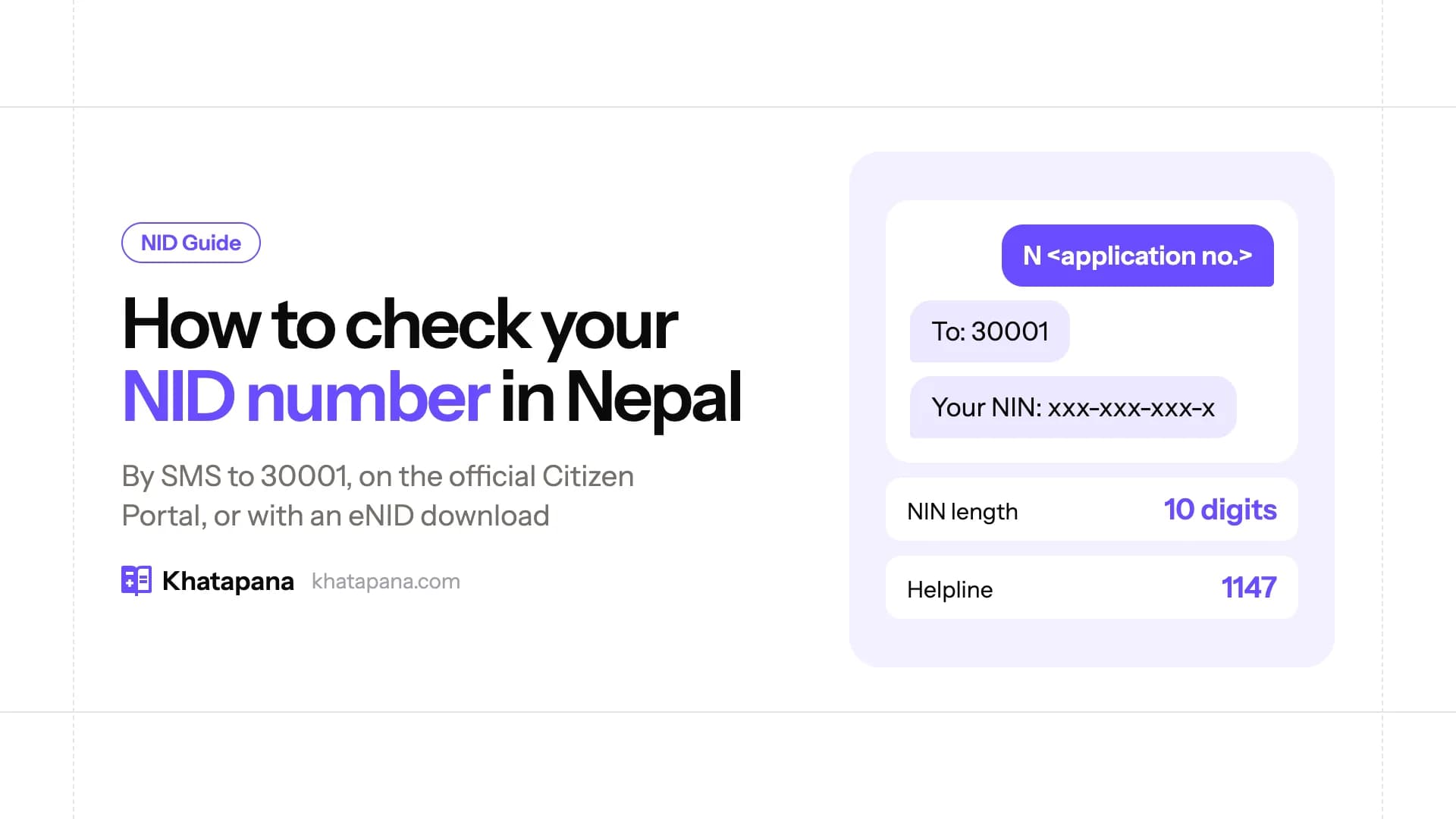
You can check your NID number (NIN) in Nepal in two official ways. One is by SMS: send N <space> your application number to 30001. The other is online, on the DoNIDCR Citizen Portal (citizenportal.donidcr.gov.np). There you can search by your 16-digit request number, or find your NIN and download your eNID using your name, date of birth and citizenship issue date. The NIN is a 10-digit number written as xxx-xxx-xxx-x.
Quick links
| What you want | Where | What you need |
|---|---|---|
| NID number by SMS | SMS to 30001 | Application number |
| NID card status / print check | https://citizenportal.donidcr.gov.np/en/check-nid-card-status | Request number (RSN) or NIN + captcha |
| Find NIN / download eNID (no application number) | https://citizenportal.donidcr.gov.np/en/check-national-id-number | Name (English and Nepali), date of birth (BS), citizenship issue date, captcha, OTP on registered mobile |
| Help | Toll-free 1147, call centre 01-5970449, Viber/WhatsApp 9851316034/35, [email protected] | — |
Not enrolled yet? Start with our NID registration guide.
Start Your Company the Smart Way
Register your business with Khatapana! From Pvt. Ltd. to firm setups, we handle all documentation, tax registration, and compliance so you can focus on growth.
🚀 Let’s Get You RegisteredWhat is the NID number (NIN)?
The National Identity Number (NIN) is the unique, non-repeating 10-digit number that DoNIDCR gives every person who completes NID enrollment. The Citizen Portal displays and validates it as xxx-xxx-xxx-x. Don't confuse it with your request number (RSN), the 16-digit number from your enrollment. You use the RSN to track the application.
When you get your NIN:
- Enrolled at a District Administration Office or Ilaka (Area) Administration Office station: right away.
- Enrolled at a ward-level campaign: a while later, by SMS.
How to know your NID number by SMS (NID card check Nepal SMS)
- Open your phone's messages app.
- Type
N, a space, then your application number. Example:N 1234567890123456. - Send it to 30001.
- You'll get a reply about your NID number.
Status by SMS: many guides say S <space> application number to 30001 returns your application or card status.
NID number check online (rastriya parichaya patra number check online)
Option A: you have your request number or NIN (NID status check / tracking)
- Go to https://citizenportal.donidcr.gov.np/en/check-nid-card-status (Citizen Portal → "NID Card Status").
- Enter your 16-digit request number (RSN) or your NIN (xxx-xxx-xxx-x). You only need one of them.
- Type the captcha and click Search.
- The portal shows your record's status. Use it to track the application and to see whether your card has been printed (NID print check).
Option B: you don't have any number (find NIN with citizenship details)
- Go to https://citizenportal.donidcr.gov.np/en/check-national-id-number (Citizen Portal → "Download eNID").
- Enter your full name in English and full name in Nepali, your date of birth (BS), and your citizenship issuing date, all exactly as on your citizenship. Then type the captcha.
- The portal sends an OTP to the mobile number registered with your NID. Enter it.
- Your National ID Number appears, with your name, date of birth and permanent address. You can then download your eNID.
What’s Everyone Really Earning in Nepal?
Compare salaries, read company reviews, and share your own anonymously. Because transparency isn’t taboo anymore.
🔍 Find Out NowNID number check from citizenship number
People often search for "NID card check by citizenship number". As of October 2026, though, the official Citizen Portal form doesn't ask for your citizenship number. It matches you on your English and Nepali name, your BS date of birth and your citizenship issue date, then verifies you by OTP (Option B above). Keep your citizenship certificate handy so you enter these exactly.
NID mobile number check: "mobile number not linked"
The eNID/NIN lookup only works if your NID record has your mobile number. The portal shows one of these messages:
- "Your mobile number is not linked to your National Identity Number (NIN)": visit the nearest National ID enrollment centre to register your mobile number against your NIN.
- "…the registered mobile number does not match": visit your nearest District Administration Office or local authority to update your mobile number.
The OTP screen also shows which number the code was sent to. If it isn't yours, update it at an enrollment centre before you continue.
NID card download (eNID)
After Option B verifies you, click Download Card to get your eNID as a password-protected PDF.
- PDF password = first 4 letters of your name in UPPERCASE + the first 4 digits of your date of birth (the BS year). Example from the portal: name RAMESH, DOB 2050-01-01 → password RAME2050.
- DoNIDCR publishes an "eNID download user manual" on the same page.
Lost or damaged card? NID card reprint
You can request a copy of your national ID card through the Citizen Portal's NID Card Replacement Payment page (https://citizenportal.donidcr.gov.np/en/nid-card-reprint). Pay NPR 500 online (Rule 13(3), National Identity Card and Registration Regulation 2077), keep the EBP number the portal gives you, and show it at verification.
When will my NID card be ready?
DoNIDCR sends an SMS when your card is printed. Collect it from the same place where you enrolled. If your status shows printed but you haven't had an SMS, call 1147 or 01-5970449.
FAQ
How can I check my NID number in Nepal? Send N <space> application number to 30001. Or go to citizenportal.donidcr.gov.np and search with your request number, or use "Download eNID" with your citizenship details to see your NIN.
How do I know my NID number by SMS? Type N, a space and your application number, then send it to 30001. That's the format DoNIDCR's official FAQ gives.
Can I check my NID card with my citizenship number? The official portal doesn't use the citizenship number. It matches your name (English and Nepali), BS date of birth and citizenship issue date, then sends an OTP to your registered mobile number.
How many digits is the NIN? Ten digits, shown as xxx-xxx-xxx-x. The 16-digit number is your request (application) number, not your NIN.
How do I check if my NID card is printed? Enter your request number or NIN on the Citizen Portal's "NID Card Status" page. You'll also get an SMS when it's ready to collect.
Can I download my NID card online? Yes. Use "Download eNID" on the Citizen Portal. After OTP verification you get a PDF. Its password is the first 4 letters of your name in capitals plus your BS birth year (e.g., RAME2050).
Internal links
- NID Registration in Nepal: Rastriya Parichaya Patra online form
- Company Registration in Digital Nepal Becomes Fully Online and Paperless (NIN needed for promoters)
Sources
- DoNIDCR, FAQ: National Identity Card (10-digit NIN; NIN at DAO/Ilaka immediately, ward campaigns later by SMS;
N <space> application no.to 30001; call centre 01-5970449; Viber/WhatsApp 9851316034/35; card-printed SMS and collection point): https://donidcr.gov.np/pages/abboyed-asked-questions--rational-identity-10 - DoNIDCR home (NID Search link, toll-free 1147, [email protected]): https://donidcr.gov.np/
- DoNIDCR Citizen Portal, NID Card Status (request number or NIN, captcha; "Request number must be 16 digits"; "NIN number must be in the format xxx-xxx-xxx-x"): https://citizenportal.donidcr.gov.np/en/check-nid-card-status
- DoNIDCR Citizen Portal, Download eNID / find NIN (fields: full name English and Nepali, DOB BS, citizenship issuing date, captcha; OTP to registered mobile; mobile-not-linked / mismatch messages; PDF password rule and RAME2050 example): https://citizenportal.donidcr.gov.np/en/check-national-id-number
- DoNIDCR Citizen Portal, NID Card Replacement Payment (NPR 500, Rule 13(3), Regulation 2077; EBP number): https://citizenportal.donidcr.gov.np/en/nid-card-reprint
Stay legally compliant
Annual returns, renewals and tax clearance without the paperwork headache.


Related Blogs

Subscribe to our newsletter
Get latest news and updates directly to your email.